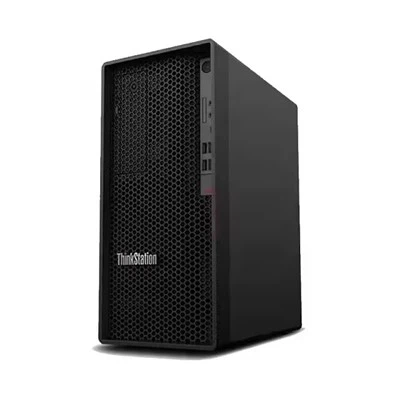
In the dynamic landscape of educational institutions, the choice of technology plays a pivotal role in shaping the learning experience. As a dedicated supplier of Lenovo workstations, I've witnessed firsthand the transformative impact these devices can have on educational settings. In this blog, we'll explore whether Lenovo workstations are suitable for educational institutions, delving into their features, benefits, and real - world applications.
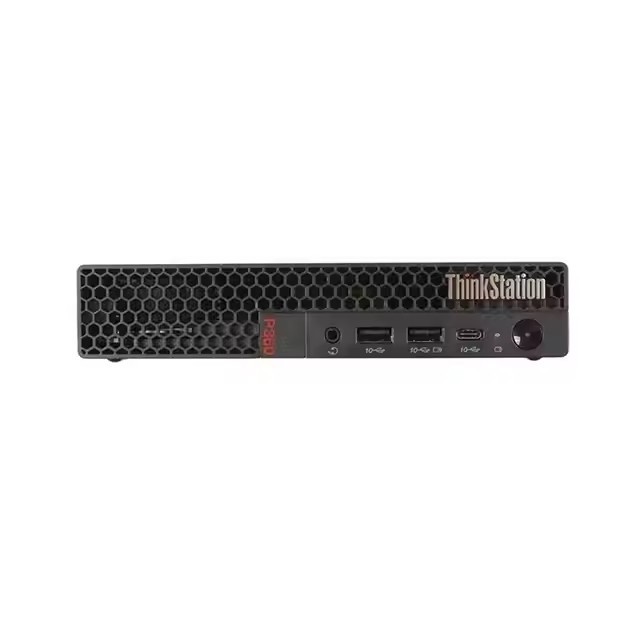

The Educational Landscape and Technological Needs
Educational institutions today are more technology - driven than ever before. From advanced research projects in universities to interactive learning in schools, there is a growing demand for high - performance computing solutions. Students and educators need devices that can handle complex tasks such as data analysis, 3D modeling, virtual reality simulations, and software development. These tasks require workstations with sufficient processing power, memory, and graphics capabilities.
Lenovo Workstations: A Comprehensive Overview
Lenovo offers a wide range of workstations tailored to different needs. Let's take a closer look at some of the popular models that are well - suited for educational environments.
Lenovo P350 Workstation
The Lenovo P350 Workstation is a compact yet powerful option. It is equipped with the latest Intel Xeon processors, which provide excellent multi - core performance. This is crucial for educational tasks that involve running multiple applications simultaneously, such as data analytics software and programming environments. The workstation also features high - speed memory and large - capacity storage options, ensuring that students and educators can store and access their data efficiently.
Lenovo P920 Workstation
For more demanding tasks, the Lenovo P920 Workstation is a top - notch choice. It comes with Intel Xeon Scalable processors and NVIDIA Quadro graphics cards. These components make it ideal for 3D modeling, animation, and virtual reality applications. In an educational context, students studying architecture, engineering, or digital arts can benefit greatly from the high - end graphics and processing capabilities of the P920.
Lenovo Tiny P360
The Lenovo Tiny P360 is a space - saving option that doesn't compromise on performance. It is perfect for classrooms and labs where space is limited. Despite its small form factor, it offers reliable performance for everyday educational tasks, such as word processing, web browsing, and basic programming.
Advantages of Lenovo Workstations in Educational Institutions
Performance and Reliability
Lenovo workstations are known for their high - performance capabilities. The powerful processors, ample memory, and advanced graphics cards ensure that students and educators can run resource - intensive applications smoothly. Whether it's running simulations, analyzing large datasets, or creating multimedia content, Lenovo workstations can handle the load. Moreover, Lenovo has a reputation for building reliable devices. Educational institutions can rely on these workstations to function consistently, minimizing downtime and disruptions to the learning process.
Customization Options
Lenovo offers a high degree of customization for its workstations. Educational institutions can choose the specific components that meet their requirements. For example, a computer science department may need workstations with high - end processors and large amounts of memory for software development projects. On the other hand, an art department may prioritize workstations with powerful graphics cards for digital art creation. This flexibility allows institutions to tailor the workstations to the unique needs of different departments and courses.
Cost - Effectiveness
In the long run, Lenovo workstations can be a cost - effective solution for educational institutions. Their reliability means fewer repairs and replacements, reducing maintenance costs. Additionally, Lenovo often offers educational discounts and special pricing for institutions, making it more affordable to equip classrooms and labs with high - quality workstations.
Security Features
Security is a major concern in educational institutions, especially when dealing with sensitive student data. Lenovo workstations come with a range of security features, such as fingerprint readers, facial recognition, and TPM (Trusted Platform Module) technology. These features help protect the data stored on the workstations and ensure the privacy and security of students and educators.
Real - World Applications in Educational Institutions
Research and Development
In universities and research institutions, Lenovo workstations are used for a variety of research projects. For example, in the field of biology, researchers can use workstations to analyze genomic data. The high - performance processors and large - capacity storage of Lenovo workstations enable them to handle the massive amounts of data generated by DNA sequencing. In physics, workstations are used for simulations of complex physical phenomena, such as particle collisions and astrophysical processes.
Multimedia and Design
In art and design schools, Lenovo workstations are essential for creating digital art, animations, and graphic designs. The powerful graphics cards and high - resolution displays of Lenovo workstations allow students to work with detailed images and videos. For example, students can use software like Adobe Photoshop, Illustrator, and Premiere Pro to create professional - quality multimedia content.
Programming and Software Development
Computer science departments rely on Lenovo workstations for programming and software development. The workstations provide the necessary processing power and memory to run integrated development environments (IDEs) and compile large - scale software projects. Students can also use virtual machines on these workstations to test their software in different operating systems.
Challenges and Considerations
While Lenovo workstations offer many advantages, there are also some challenges and considerations for educational institutions.
Initial Investment
The initial cost of purchasing Lenovo workstations can be relatively high, especially for institutions with limited budgets. However, as mentioned earlier, the long - term cost - effectiveness and the benefits they provide often outweigh the initial investment.
Technical Support
Educational institutions need to ensure that they have access to reliable technical support. Lenovo offers technical support services, but institutions may also need to train their IT staff to handle basic maintenance and troubleshooting tasks.
Compatibility
When integrating Lenovo workstations into existing educational systems, institutions need to ensure compatibility with software applications and network infrastructure. This may require some additional configuration and testing.
Conclusion
In conclusion, Lenovo workstations are highly suitable for educational institutions. Their performance, reliability, customization options, cost - effectiveness, and security features make them an ideal choice for a wide range of educational tasks. Whether it's for research, multimedia creation, or programming, Lenovo workstations can meet the diverse needs of students and educators.
If you're an educational institution looking to upgrade your computing infrastructure or equip your classrooms and labs with high - quality workstations, I encourage you to reach out for a procurement discussion. We can help you select the right Lenovo workstations for your specific needs and provide you with the best possible pricing and support.
References
- Lenovo official product documentation
- Educational technology research reports on workstation usage in institutions