


As a supplier of Lenovo workstations, I often get asked whether Lenovo workstations support RAID configuration. Well, the short answer is yes! Most Lenovo workstations do support RAID (Redundant Array of Independent Disks) configurations, and in this blog post, I'll break down the details for you.
What is RAID?
Before we dive into Lenovo's support for RAID, let's quickly go over what RAID is. RAID is a technology that combines multiple physical disk drives into one or more logical units for data redundancy, performance improvement, or both. There are different RAID levels, each with its own characteristics and use cases. For example, RAID 0 stripes data across multiple drives for increased performance but offers no data redundancy. RAID 1 mirrors data between two drives, providing redundancy in case one drive fails.
Lenovo Workstations and RAID Support
Thinkstation P340 Tower
The Thinkstation P340 Tower is a popular choice among users who need a reliable and powerful workstation. It comes with support for various RAID configurations. The motherboard in the Thinkstation P340 Tower typically has built - in RAID controllers that allow you to set up RAID 0, RAID 1, RAID 5, and RAID 10.
If you're a content creator who needs to quickly access large video files, setting up a RAID 0 array can significantly boost your read and write speeds. On the other hand, if data safety is your top priority, RAID 1 or RAID 10 would be better options as they provide data redundancy.
Lenovo P920 Workstation
The Lenovo P920 Workstation is a high - end workstation designed for demanding applications such as 3D modeling, rendering, and scientific simulations. It offers even more advanced RAID support. With its powerful hardware and advanced RAID controllers, you can easily configure complex RAID arrays.
The P920 supports all the common RAID levels and also has features like hot - swapping drives. This means that you can replace a failed drive without shutting down the workstation, minimizing downtime. Whether you're running a large - scale data processing project or a mission - critical application, the RAID support in the Lenovo P920 gives you the peace of mind that your data is safe and accessible.
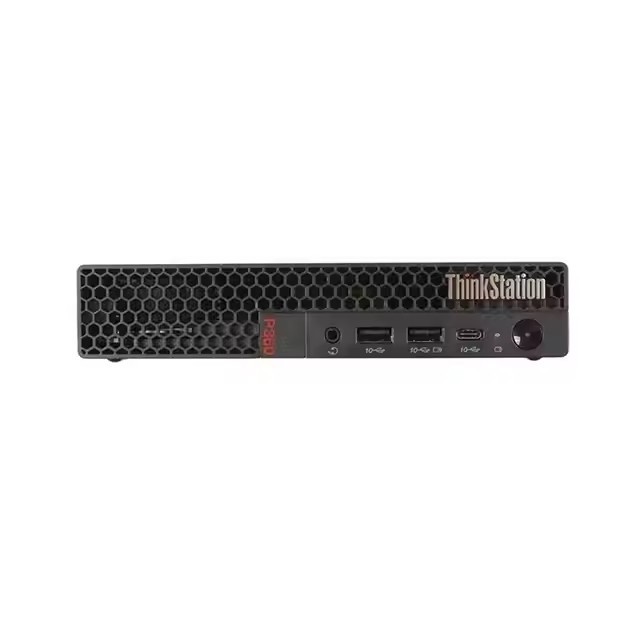
Lenovo Tiny P360
The Lenovo Tiny P360 is a compact yet powerful workstation. Despite its small size, it still supports RAID configurations. It's a great option for users who have limited desk space but still need the benefits of RAID.
The Tiny P360 can support basic RAID levels like RAID 0 and RAID 1. If you're a small business owner or a home user who wants to protect your important files or improve the performance of your workstation, the RAID support in the Lenovo Tiny P360 can be a valuable addition.
How to Set Up RAID on Lenovo Workstations
Setting up RAID on a Lenovo workstation is relatively straightforward. Here are the general steps:
- Enter the BIOS/UEFI Setup: When you boot up your Lenovo workstation, you need to enter the BIOS or UEFI setup. Usually, you can do this by pressing a specific key during the boot process, such as F1 or F2.
- Locate the RAID Configuration Option: Once you're in the BIOS/UEFI setup, look for the RAID configuration option. It might be under a section called "Storage" or "SATA Configuration".
- Select the RAID Level: Choose the RAID level that suits your needs. You'll also need to select the physical drives that you want to include in the RAID array.
- Save and Exit: After you've configured the RAID settings, save the changes and exit the BIOS/UEFI setup. The workstation will then initialize the RAID array, which might take some time depending on the size of the drives and the RAID level.
Benefits of Using RAID on Lenovo Workstations
- Data Redundancy: One of the biggest advantages of using RAID is data redundancy. In case a drive fails, your data is still safe and can be recovered. This is crucial for businesses and individuals who can't afford to lose important data.
- Improved Performance: RAID 0 can significantly improve the read and write speeds of your workstation. This is especially beneficial for applications that require fast data access, such as video editing and gaming.
- Scalability: You can easily expand your storage capacity by adding more drives to your RAID array. This allows you to meet the growing storage needs of your business or personal projects.
Considerations When Using RAID on Lenovo Workstations
- Cost: Setting up a RAID array can be more expensive than using a single drive. You'll need to purchase multiple drives, and in some cases, a dedicated RAID controller.
- Complexity: While setting up basic RAID levels is relatively easy, more complex RAID configurations might require some technical knowledge. If you're not familiar with RAID, it's a good idea to consult a professional.
- Data Loss Risk: Although RAID provides data redundancy, there's still a risk of data loss if multiple drives fail simultaneously or if there are issues with the RAID controller. It's always a good idea to have a backup of your important data.
Conclusion
In conclusion, Lenovo workstations offer excellent support for RAID configurations. Whether you're using a high - end workstation like the Lenovo P920 or a compact one like the Lenovo Tiny P360, you can take advantage of the benefits that RAID has to offer.
If you're interested in purchasing a Lenovo workstation with RAID support or have any questions about RAID configurations, feel free to reach out for a procurement discussion. We're here to help you find the best solution for your needs.

References
- Lenovo official documentation
- Industry reports on workstation storage technologies




