Hey there! I'm a supplier of Lenovo workstations, and I get this question a lot: "How do I choose the right Lenovo workstation for my needs?" Well, you've come to the right place. In this blog, I'll break down the key factors you should consider and recommend some great Lenovo workstations based on different requirements.
Understanding Your Workload
First things first, you need to understand your workload. Are you a graphic designer, a video editor, a 3D modeler, or a data analyst? Different tasks require different levels of performance.


- Graphic Designers: You need a workstation that can handle high-resolution images and complex vector graphics. A powerful CPU and a good GPU are essential for smooth editing and rendering. For example, if you're working on Adobe Photoshop, Illustrator, or InDesign, you'll benefit from a workstation with multiple cores and a decent amount of RAM.
- Video Editors: Video editing is a resource-intensive task. You'll need a workstation with a fast CPU, a high-end GPU, and plenty of RAM and storage. Real-time preview, rendering, and encoding require a lot of processing power. Programs like Adobe Premiere Pro, Final Cut Pro, and DaVinci Resolve demand a robust system to handle large video files and complex effects.
- 3D Modelers and Animators: 3D modeling and animation involve creating and manipulating complex 3D objects in a virtual environment. This requires a workstation with a powerful GPU, a multi-core CPU, and a large amount of RAM. Applications like Autodesk Maya, 3ds Max, and Blender rely on high-performance hardware to provide a smooth and interactive experience.
- Data Analysts: Data analysis involves working with large datasets and running complex algorithms. A workstation with a fast CPU, a large amount of RAM, and high-speed storage is crucial for quick data processing and analysis. Tools like Python, R, and SQL are commonly used in data analysis, and they can benefit from a powerful workstation.
Key Components to Consider
Now that you understand your workload, let's take a look at the key components you should consider when choosing a Lenovo workstation.
- CPU (Central Processing Unit): The CPU is the brain of your workstation. It determines how fast your computer can process data and run applications. Look for a CPU with multiple cores and a high clock speed. Intel Xeon processors are a popular choice for workstations because they offer excellent performance and reliability.
- GPU (Graphics Processing Unit): The GPU is responsible for rendering graphics and videos. It's especially important for tasks like graphic design, video editing, and 3D modeling. NVIDIA Quadro and AMD Radeon Pro GPUs are designed for professional use and offer high performance and reliability.
- RAM (Random Access Memory): RAM is used to store data that your computer is currently using. The more RAM you have, the more applications and data you can run simultaneously without slowing down your computer. For most professional tasks, I recommend at least 16GB of RAM, but if you're working with large datasets or complex projects, you may need 32GB or more.
- Storage: You need fast and reliable storage to store your files and applications. Solid-state drives (SSDs) are much faster than traditional hard disk drives (HDDs) and offer better performance. Consider getting a large-capacity SSD for your operating system and applications, and a secondary HDD or SSD for storing your data.
- Display: A high-quality display is essential for tasks like graphic design and video editing. Look for a display with a high resolution, good color accuracy, and a wide viewing angle. Lenovo offers a range of displays that are compatible with their workstations.
Recommended Lenovo Workstations
Based on different requirements, here are some recommended Lenovo workstations:
- For Graphic Designers and Video Editors: The Thinkstation P340 Tower is a great choice. It offers a powerful CPU, a high-end GPU, and plenty of RAM and storage. It's also compact and easy to manage, making it suitable for small offices or home studios.
- For 3D Modelers and Animators: The Lenovo P920 Workstation is a top-of-the-line workstation that offers exceptional performance. It features the latest Intel Xeon processors, NVIDIA Quadro GPUs, and a large amount of RAM and storage. It's designed to handle the most demanding 3D modeling and animation tasks.
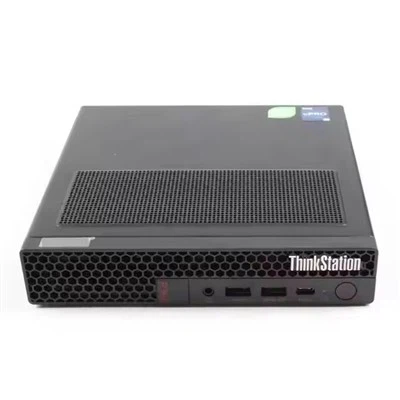
- For Data Analysts and Small Businesses: The Lenovo Tiny P360 is a compact and affordable workstation that offers good performance. It's suitable for tasks like data analysis, office work, and web development. It's also energy-efficient and easy to install and manage.
Other Considerations
In addition to the key components and recommended workstations, there are some other considerations you should keep in mind:
- Budget: Workstations can be expensive, so it's important to set a budget and stick to it. Consider the long-term costs of ownership, including maintenance, upgrades, and software licenses.
- Expandability: You may need to upgrade your workstation in the future, so look for a workstation that offers good expandability. This includes the ability to add more RAM, storage, and GPUs.
- Warranty and Support: Lenovo offers a range of warranty and support options for their workstations. Make sure you choose a warranty that meets your needs and provides good customer support.
- Software Compatibility: Make sure the workstation you choose is compatible with the software you use. Check the system requirements of your applications and make sure the workstation meets or exceeds them.
Conclusion
Choosing the right Lenovo workstation for your needs can be a daunting task, but it doesn't have to be. By understanding your workload, considering the key components, and choosing a workstation that meets your requirements and budget, you can find the perfect workstation for your needs.
If you're interested in purchasing a Lenovo workstation or have any questions, please feel free to contact me. I'm here to help you make the right decision and ensure that you get the best value for your money.
References
- Lenovo official website
- Industry reports on workstation performance
- User reviews and testimonials