The data transfer rate of a Hard Disk Drive (HDD) is a critical metric that determines how quickly data can be read from or written to the drive. As an HDD supplier, understanding and communicating this concept is essential for both consumers and businesses looking to make informed decisions about their storage needs.
What is Data Transfer Rate?
Data transfer rate refers to the speed at which data can be moved between the HDD and the computer's system. It is typically measured in megabytes per second (MB/s) or gigabytes per second (GB/s). A higher data transfer rate means that data can be accessed and transferred more quickly, resulting in faster system performance, shorter loading times, and improved overall user experience.
There are two main types of data transfer rates associated with HDDs: sequential and random.
Sequential Data Transfer Rate
Sequential data transfer rate measures how fast data can be read or written when it is stored in a continuous, unbroken sequence on the disk. This is common when transferring large files, such as videos, high - resolution images, or backing up large amounts of data. For example, when you are copying a large movie file from your HDD to an external drive, the sequential data transfer rate comes into play.
Modern HDDs can achieve sequential read and write speeds ranging from around 100 MB/s to over 200 MB/s, depending on several factors. These factors include the rotational speed of the disk platters, the density of data storage on the platters, and the interface used to connect the HDD to the computer.
Random Data Transfer Rate
Random data transfer rate, on the other hand, measures how fast the drive can access small, scattered pieces of data. This is important for tasks such as booting up the operating system, launching applications, and performing database operations. In these scenarios, the computer needs to access multiple small files or data segments that are not stored adjacent to each other on the disk.
Random data transfer rates are generally much lower than sequential rates. For HDDs, random read and write speeds can be in the range of a few MB/s to around 20 - 30 MB/s. This is because the read - write head of the HDD has to physically move across the disk platters to access the scattered data, which takes time.
Factors Affecting HDD Data Transfer Rate
Rotational Speed
The rotational speed of an HDD is measured in revolutions per minute (RPM). Common RPM values for HDDs are 5400 RPM and 7200 RPM, with some enterprise - grade HDDs reaching 10,000 RPM or even 15,000 RPM. A higher rotational speed means that the disk platters spin faster, allowing the read - write head to access data more quickly. As a result, HDDs with higher RPMs generally have higher sequential data transfer rates. For example, a 7200 RPM HDD will typically have a faster sequential read and write speed compared to a 5400 RPM HDD.
Data Density
Data density refers to the amount of data that can be stored on a given area of the disk platter. Higher data density means that more data can be packed into a smaller space. When data is more densely packed, the read - write head can access more data in a single pass, potentially increasing the data transfer rate. Advances in HDD technology have led to significant improvements in data density over the years, allowing for larger capacity drives with better performance.
Interface
The interface used to connect the HDD to the computer also plays a crucial role in determining the data transfer rate. The most common interfaces for HDDs are Serial ATA (SATA) and Small Computer System Interface (SCSI). SATA is widely used in consumer - grade computers, with different versions offering different maximum data transfer speeds. For example, SATA III has a maximum theoretical transfer rate of 6 Gbps (gigabits per second), which is equivalent to approximately 750 MB/s. However, the actual data transfer rate of an HDD connected via SATA III is usually much lower due to the physical limitations of the drive itself.

SCSI, on the other hand, is commonly used in enterprise - level applications and offers higher data transfer rates and better performance in terms of reliability and multi - user support.
Comparing Different HDD Models
As an HDD supplier, we offer a wide range of HDDs with different capacities and performance characteristics. For instance, our HDD 22TB is designed for users who need large - scale storage. While it may not have the highest data transfer rate compared to some smaller - capacity, high - performance drives, it provides an excellent balance between storage capacity and cost - effectiveness.
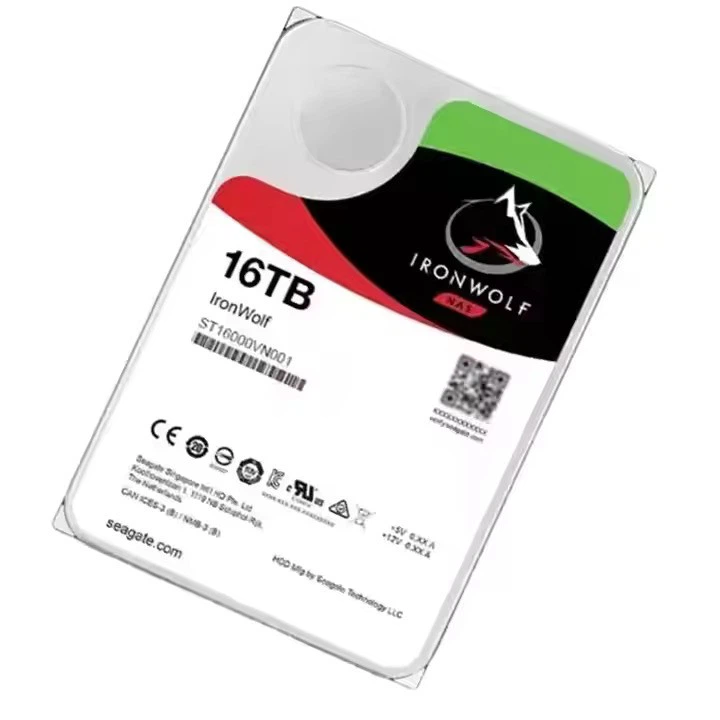
Our 16TB HDD is another popular option. It offers a good combination of capacity and performance, suitable for both home users who want to store a large media library and small - to - medium - sized businesses that need to store important data.
For enterprise customers with more demanding performance requirements, our Dell HDD 10TB is a great choice. It is optimized for high - speed data access and can handle heavy workloads, such as database management and server applications.
Importance of Data Transfer Rate in Different Use Cases
Home Use
In a home environment, a higher data transfer rate can significantly improve the user experience. For example, if you are a gamer, a faster HDD can reduce the loading times of games, allowing you to jump into the action more quickly. If you are a content creator, such as a video editor or photographer, a high - speed HDD can speed up the process of importing, editing, and exporting large media files.
Business Use
In a business setting, data transfer rate is even more critical. For companies that rely on large databases, such as e - commerce businesses or financial institutions, fast data access is essential for real - time decision - making. A slow HDD can lead to delays in retrieving customer information, processing transactions, and generating reports, which can ultimately affect the bottom line.
Data Centers
Data centers are responsible for storing and managing vast amounts of data. HDDs with high data transfer rates are crucial for ensuring efficient data processing and retrieval. They help to minimize latency and improve the overall performance of the data center infrastructure, which is essential for serving a large number of users and applications simultaneously.
Conclusion
As an HDD supplier, we understand that the data transfer rate is a key factor in choosing the right HDD for your needs. Whether you are a home user looking for a reliable storage solution or a business in need of high - performance drives, we have a range of products to meet your requirements.
If you are interested in learning more about our HDD products or have specific questions about data transfer rates and how they relate to your use case, we encourage you to contact us for a detailed discussion and to start the procurement process. Our team of experts is ready to assist you in making the best choice for your storage needs.
References
- "Hard Disk Drives: Technology and Applications" by John D. Ciaccia
- "Storage Area Networks: Fundamentals, Technology, and Best Practices" by Robert Graham