What Is the Impact of 128G RAM on System Noise?
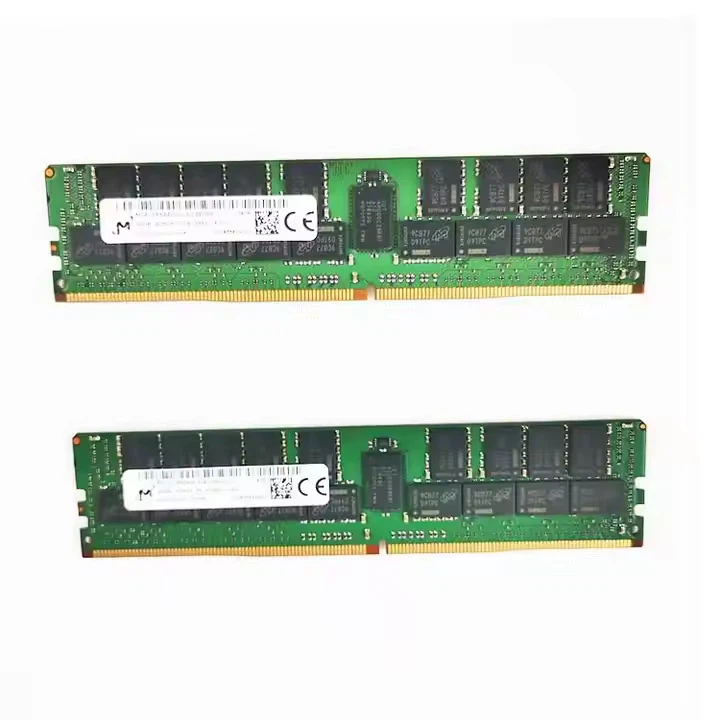

In the ever - evolving landscape of computer technology, the demand for high - performance systems is constantly on the rise. One of the key components in a computer system is Random Access Memory (RAM), which plays a crucial role in determining a system's speed and multitasking capabilities. Among the various RAM capacities available in the market, 128G RAM has emerged as a high - end option for users with intensive computing needs, such as content creators, data analysts, and gamers. As a leading supplier of [link text="128G RAM" url="/ram/dell-ram/128g-ram.html"], we've been closely following the impact of this large - capacity RAM on system noise, a factor that is often overlooked but can significantly affect the user experience.
Understanding RAM and Its Role in a System
RAM is a type of computer memory that temporarily stores data that a computer's processor can access quickly. When you open an application or a file, it is loaded into the RAM so that the CPU can work on it rapidly. The more RAM a system has, the more data it can hold for quick access, which generally leads to smoother multitasking and faster overall system performance. For instance, a user running multiple virtual machines simultaneously, or working with large - scale datasets in a data analysis software, will benefit greatly from having 128G of RAM as it allows all these operations to run without significant slowdowns.
However, as the capacity of RAM increases, so do the technical challenges associated with it, including power consumption and heat generation. These are the key factors that can ultimately influence system noise.
Heat Generation and Cooling
One of the primary reasons why the capacity of RAM can affect system noise is heat generation. With more memory chips packed into 128G RAM modules compared to lower - capacity ones like [link text="Dell RAM 8GB" url="/ram/dell-ram/dell-ram-8-gb.html"] or [link text="Dell 16G RAM" url="/ram/dell-ram/dell-16g-ram.html"], the amount of electrical energy converted into heat is also greater. High temperatures can degrade the performance and lifespan of the RAM, so proper cooling measures are essential.
Most computer systems use fans to dissipate heat from the components, including the RAM. When a system has 128G of RAM generating heat, the fans may need to work harder and spin at higher speeds to maintain an optimal temperature. The faster the fans spin, the louder the noise they produce. This increase in noise can be a significant concern, especially in a quiet working environment or a home setup where noise can be a distraction.
Manufacturers have come up with various solutions to mitigate the heat problem. Some high - end 128G RAM modules are equipped with heat spreaders. These are metal or ceramic plates attached to the RAM chips that help transfer heat away from the chips more efficiently. By reducing the temperature of the RAM chips, the fans may not need to work as hard, resulting in lower system noise.
Another approach is liquid cooling. Although more commonly used for CPUs and GPUs, some advanced computer builds may also implement liquid cooling for the RAM. Liquid cooling systems can be more effective at dissipating heat than air - cooling fans, and they often operate more quietly. However, they are also more expensive and complex to install and maintain.
Power Consumption
In addition to heat generation, power consumption is another factor related to system noise. A 128G RAM module typically consumes more power than a lower - capacity module. Higher power consumption means more electrical energy is being used, and this can lead to increased heat production in the power supply unit (PSU) as well.
To handle the additional power requirements, the PSU may need to work harder, which can cause its internal fan to spin faster. Similar to the case of the cooling fans for the RAM, a faster - spinning PSU fan will generate more noise. Moreover, power - hungry components like 128G RAM can also put more strain on the motherboard's power delivery circuits, which can generate their own heat and potentially require additional cooling measures, further contributing to system noise.
Case Design and Airflow
The case design of the computer system also plays a crucial role in determining the impact of 128G RAM on system noise. A well - designed case with proper airflow can help keep the temperatures of all components, including the RAM, in check more effectively.
Some cases are specifically designed with dedicated channels for airflow over the RAM modules. By ensuring a constant flow of cool air over the RAM, the heat can be dissipated more efficiently, reducing the load on the cooling fans and thus lowering system noise. Additionally, cases with good cable management can also contribute to better airflow. When cables are neatly routed, they are less likely to obstruct the airflow paths, allowing the fans to work more effectively.
Impact on Different User Environments
The impact of 128G RAM - induced system noise can vary greatly depending on the user environment. In a professional data center environment, where there may already be a significant amount of background noise from multiple servers and cooling systems, the additional noise from 128G RAM may not be as noticeable. However, data centers also have strict energy - efficiency and noise - level regulations, so even a slight increase in noise can be a concern.
In a home office or a gaming setup, where the user may be sitting in close proximity to the computer for long periods, the noise can be a major annoyance. Gamers, in particular, often value a quiet gaming environment to fully immerse themselves in the game. Content creators who spend hours working on audio and video projects also require a quiet workspace to accurately judge the quality of their work.
Mitigating the Noise Impact
If you are considering upgrading to 128G RAM and are concerned about the potential increase in system noise, there are several steps you can take.
First, choose high - quality RAM modules from reputable manufacturers. These modules are often better designed with efficient heat spreaders and lower power consumption, which can help reduce heat generation and thus noise. Second, invest in a good - quality case with excellent airflow design. This will ensure that the heat from the RAM and other components can be dissipated effectively without the need for the fans to work at high speeds.
Third, consider using low - noise fans. There are many fans available in the market that are specifically designed to operate quietly while still providing sufficient airflow. Finally, if possible, implement liquid cooling solutions for the RAM and other high - heat components. This can significantly reduce the noise level of your system.
Call to Action
As a leading supplier of [link text="128G RAM" url="/ram/dell-ram/128g-ram.html"], we understand the importance of balancing performance and noise in a computer system. Our 128G RAM products are designed with the latest technology to minimize heat generation and power consumption, thus reducing the impact on system noise. If you are interested in upgrading your system to 128G RAM or have any questions regarding the impact on system noise, we encourage you to reach out to us. We are more than happy to assist you in making an informed decision and help you find the best solution for your specific needs.
References
- Thompson, D. (2020). The Ultimate Guide to Computer RAM. Technology Today Press.
- Smith, A. and Johnson, B. (2021). Cooling Solutions for High - Performance Computer Components. Computing Review Journal.
- Brown, C. (2019). Power Consumption and Efficiency in Modern Computer Systems. Energy and Computing Magazine.